
Bitdefender Review 2026
Last Updated: August 19, 2026
Bitdefender is a Romanian security company whose detection engine is well enough regarded that other vendors license it for their own products. That reputation is built on a specific strength: the engine finds threats accurately without flagging clean software, and it does so while using very little of the machine it runs on.
The 2026 test results back that up. AV-TEST awarded Bitdefender a perfect 6 out of 6 for protection, performance and usability in both its April and June 2026 Windows 11 rounds. AV-Comparatives recorded a 99.94% online protection rate in March 2026 with only four false alarms, the lowest count among the products in this comparison.
The complication is the product range. Bitdefender sells several consumer tiers and the differences between them are substantial, so choosing the wrong one means paying for a suite whose most useful pieces are locked. The VPN is capped at 200MB per day on everything below Premium Security, and parental controls need the Family plan. Get the tier right and Bitdefender is excellent value; get it wrong and you will be disappointed by features you assumed were included.
Protection: What the Independent Labs Found
Bitdefender is a consistent top performer rather than an occasional one, which matters more than any single result.
In the AV-TEST evaluation for Windows 11 home users, Bitdefender Total Security took the maximum 6 out of 6 for protection, 6 out of 6 for performance and 6 out of 6 for usability in April 2026, and repeated the perfect score in the June 2026 round alongside Norton, ESET, F-Secure, Kaspersky and McAfee.
AV-Comparatives ran its Real-World Protection Test across February to May 2026, exposing products to live threats as they appear online. Bitdefender blocked 398 of 400 test cases, a 99.5% protection rate, and earned an Advanced+ award. In the separate March 2026 Malware Protection Test it reached a 99.94% online protection rate.
The number worth dwelling on is the false alarm count: four. Norton recorded nine in the same round and TotalAV recorded nineteen. A false alarm is when security software flags a clean file, installer or website as dangerous. It sounds harmless, but the practical cost is real. Every false alarm is an interruption, and a product that cries wolf regularly teaches people to click through warnings without reading them, which is exactly the habit that gets someone infected later. Four is close to the floor of what is achievable.
None of this means Bitdefender catches things its rivals miss. The leading suites are all clustered within a fraction of a percent of each other on detection. What Bitdefender does better is stay quiet while doing it.
Key Features
- Cloud-Based Scanning Engine
Bitdefender pushes the heavy analysis to its own servers rather than running it on your machine, and its Photon technology learns which applications you use regularly so it can stop re-inspecting them. This is the mechanism behind the low system impact, not marketing language. - Advanced Threat Defense
Monitors running processes for behavior that suggests an attack, such as a program suddenly encrypting files or injecting code into another process. This catches malware that has no signature yet, which signature databases alone cannot do. - Multi-Layer Ransomware Protection and Remediation
Blocks unauthorized changes to protected folders, and Ransomware Remediation can restore files an attack managed to encrypt. Note that remediation ships disabled by default and has to be switched on in the Protection settings. - Safepay and Anti-Fraud
Safepay opens banking and shopping sites in an isolated browser that other processes cannot read from, screenshot or log keystrokes in. The anti-fraud filters block phishing pages before they load. - Autopilot
Acts as a security advisor, applying sensible settings and surfacing recommendations rather than asking you to configure anything. For most people the product is genuinely install-and-forget. - Webcam and Microphone Protection
Notifies you when an application requests camera or microphone access and lets you block it per app.
Plans and Pricing
Bitdefender used to separate its tiers partly by platform, with the entry product running on Windows alone. That is no longer the case. Every current consumer tier covers Android, Windows, Mac and iOS, so the choice is now about device count and features rather than about which machines you own.
- Antivirus Plus - $24.99 for the first year for 1 device, or $29.99 for 3 devices, with antivirus, scam protection, data breach detection and the 200MB per day VPN
- Total Security - $59.99 for the first year for 5 devices, adding a password manager, webcam and microphone protection, anti-tracker and the optimization tools
- Total Security Family - $79.99 for the first year, 5 accounts and up to 25 devices, adding parental controls
- Premium Security - $79.99 for the first year for 5 devices, or $99.99 for the 25-device family plan, adding an unlimited VPN and Scam Protection Pro
- Ultimate Security - adds identity protection, dark web monitoring and identity theft insurance
Two things are worth knowing before you choose.
The first is the VPN. Antivirus Plus and Total Security both include Bitdefender VPN with a 200MB per day allowance per device. That is enough to check email or log into a banking app on hotel Wi-Fi, and it is not enough for streaming, video calls or leaving the VPN on all day. Unlimited VPN traffic starts at Premium Security, which is the single biggest reason to step up a tier.
The second is parental controls. They are not part of standard Total Security. They arrive with the Family plan, which also raises the allowance to 25 devices across 5 accounts. If you are buying for a household with children, budget for the Family tier rather than assuming the mid plan covers it.
The other point is renewal, which applies across the range. First-year prices are promotional, auto-renewal is on by default, and the second-year charge arrives at the standard rate. Turning auto-renewal off in your Bitdefender Central account after purchase, then renewing deliberately, is the simplest way to stay in control of the cost.
For a single machine, Antivirus Plus at $24.99 is a lot of protection for the money. For a household, Total Security at five devices is the natural target, and Premium Security is worth the difference only if you will use the unlimited VPN.
Cloud Scanning & System Speed (Photon Engine)
This is Bitdefender's signature strength and the results are unusually consistent. AV-TEST gave it a full 6 out of 6 for performance in both the April and June 2026 Windows 11 rounds, meaning no measurable slowdown across the standard workload of launching applications, copying files, downloading and browsing.
The reason is architectural. Because signature matching and file reputation lookups happen in Bitdefender's cloud, the local client stays small, and Photon builds a profile of the applications you launch every day so they are not re-scanned from scratch each time. On a laptop running on battery, that difference is noticeable over a working day.
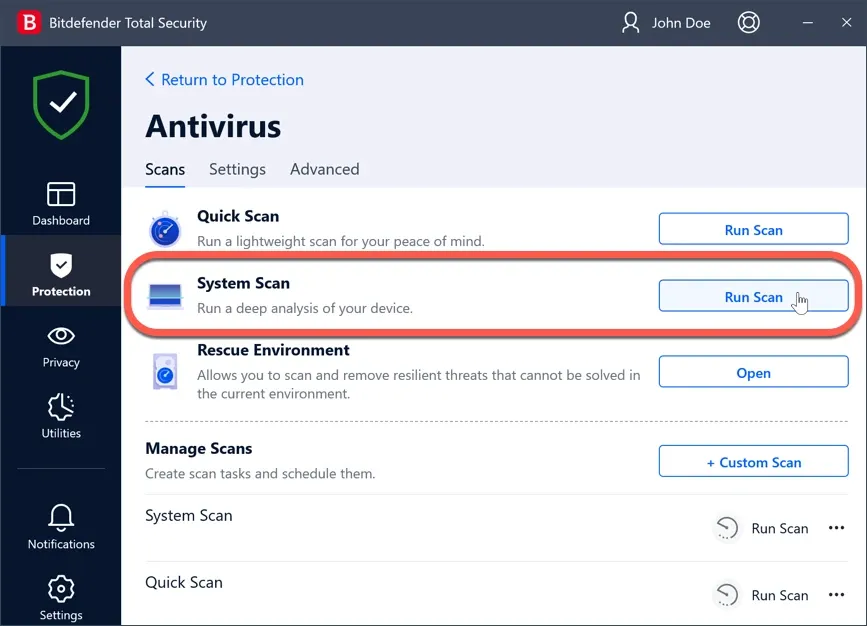
The honest caveat is the same one that applies to every product in this category: the first full system scan after installation has to examine every file on the drive, and on a large or mechanical disk that takes a while. Subsequent scans are incremental and considerably faster. Schedule the first one for a time you are not using the machine and the issue disappears.
Bitdefender Central & Multi-Device Protection
Total Security and above cover Windows, macOS, Android and iOS from a single license, managed through the Bitdefender Central web console. That console is genuinely useful when you are the person who supports a family: you can see which devices are protected, which are out of date and which have unresolved alerts from one page, without touching each machine.
The Android app includes malware scanning, Web Protection, Scam Alert for malicious links arriving by message or notification, and an app lock. The iOS app is limited by Apple's platform rules to Web Protection, VPN and account privacy checks, which is the same constraint every vendor works under.
Worth noting if you are working from older reviews: Antivirus Plus used to be a Windows-only product, and a lot of published comparisons still describe it that way. Bitdefender has since made it multiplatform, so the cheapest way into the range now covers a phone and a Mac as well as a PC. What separates it from Total Security is the device allowance and the extra tools, not the operating systems it will install on.
Privacy and Optimization Tools
Total Security bundles a set of secondary tools that are easy to overlook and account for a fair amount of the difference in price against a plain antivirus.
Anti-Tracker blocks the trackers that follow you between sites and reports how many were stopped per page, which also speeds up loading on heavily instrumented news and shopping sites. The Password Manager stores credentials, card details and notes in an encrypted vault and fills them across browsers and mobile devices.
File Shredder overwrites deleted files so they cannot be recovered, which matters when you are selling or handing on a machine. The Vulnerability Scan checks for missing Windows updates, outdated applications and weak account passwords, and reports them as a prioritized list rather than a raw dump. Unpatched software is a more common route into a home machine than novel malware, so this is a more useful feature than it first appears.
The optimization side covers a OneClick Optimizer for junk files and registry entries, a startup manager, and a Profiles system that suppresses notifications and defers background tasks when it detects that you are gaming, watching video or working. Profiles is a small thing that removes the most common reason people disable security software.
Parental controls are worth calling out because of how they are packaged. They cover screen time, content filtering and location on children's devices, but they are tied to the Family plan rather than being included with the standard Total Security tier. If parental controls are a requirement, confirm which plan carries them before buying rather than assuming they arrive with the mid tier.
None of these tools would justify the subscription on their own. Together they explain why Total Security sits above Antivirus Plus in price, and they are more substantial than the equivalent extras in most competing suites.
Settings Worth Changing After Installation
Autopilot is the reason Bitdefender is easy to live with, and it is also the reason a few useful things stay switched off. Because the product presents itself as handling everything, most people never look. Four settings are worth the ten minutes.
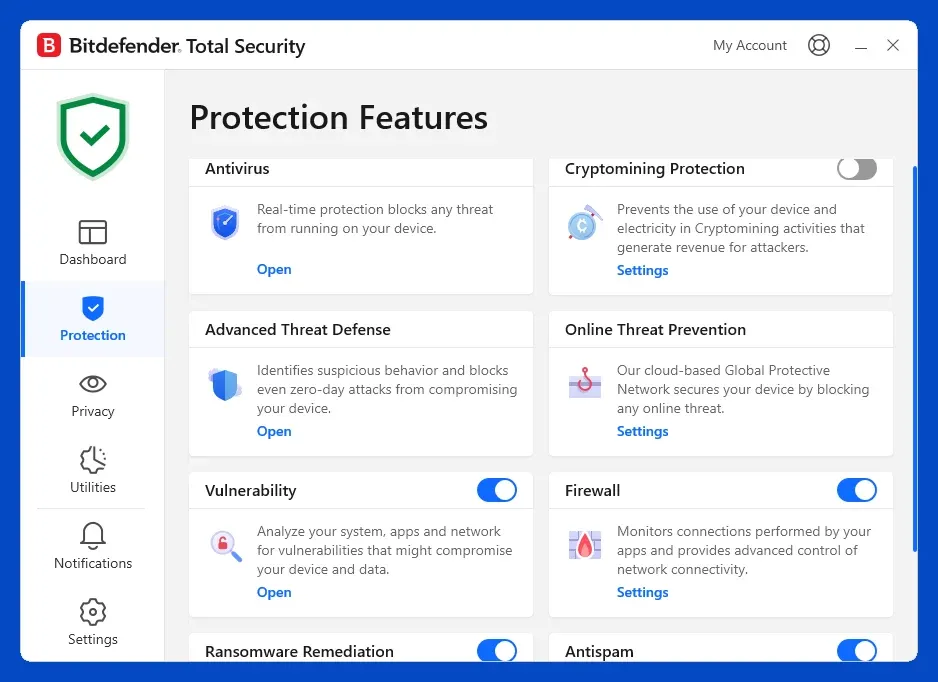
Turn on Ransomware Remediation. It ships disabled. Found under Protection, it keeps shadow copies of files in protected folders so that if an attack encrypts them, Bitdefender can restore the originals. This is the difference between a bad afternoon and losing your documents, and it is off by default because it uses disk space. Turn it on and add any folders outside the standard locations.
Add your real working folders to Safe Files. The default protected set covers Documents, Pictures, Videos and Desktop. It does not cover a projects directory at the root of a drive, a photo library on a second disk, or a synced folder from another cloud service. Ransomware protection that guards the wrong directories protects nothing that matters.
Run the Vulnerability Scan once, then schedule it. Unpatched applications are a more common route into a home machine than novel malware, and this is the one tool in the suite that finds them. Running it once and fixing what it reports removes more real risk than any amount of additional scanning.
Check whether Profiles is doing what you want. Bitdefender detects gaming, video and work sessions and defers background tasks during them. That is usually welcome, but it also means scheduled scans can be pushed back repeatedly on a machine that is always busy. If your scan history looks emptier than expected, this is why.
None of this is required for the product to protect you. It is the difference between the protection you bought and the protection you are actually running.
Autopilot UI Experience & Customer Support
Bitdefender aims at two audiences at once and mostly succeeds. Autopilot means the default experience requires no decisions, and the main dashboard puts a single status indicator and a Quick Scan button front and center.
Underneath that, the settings are layered into Protection, Privacy and Utilities sections, and finding a specific control can mean going two or three levels deep. This is where the Ransomware Remediation default matters most: because the product presents itself as handling everything automatically, few users go looking for a feature that is switched off. It is worth opening Protection, finding Ransomware Remediation and enabling it as a first step after installation.
Support is available by chat, email and phone. Priority support is reserved for Premium Security and above, so on lower tiers expect standard queue times.
Verdict: Who Should Get Bitdefender Total Security?
Bitdefender is the strongest pick for anyone running older or lower-powered hardware, where the difference between a light and a heavy security suite is felt daily. It is equally well suited to people who are irritated by security software that interrupts them, given the false alarm figures.
It also suits buyers who are comfortable managing their subscription actively, taking the low first-year price and reviewing the cost before renewal rather than letting it roll over.
Look elsewhere if you need an unlimited VPN or parental controls without stepping up to the higher tiers. In that case a suite that includes both at the mid tier, such as Norton, will work out simpler and often cheaper overall.
Pros & Cons
Pros
- Perfect 6/6/6 in the AV-TEST April and June 2026 Windows 11 evaluations
- Only four false alarms in the AV-Comparatives March 2026 test, the lowest in this comparison
- Blocked 398 of 400 samples in the February to May 2026 real-world test
- Cloud-based scanning keeps system impact among the lowest of any suite
- Every tier covers Android, Windows, Mac and iOS, starting at $24.99 for the first year
- Safepay provides an isolated browser for banking and shopping
Cons
- The bundled VPN is capped at 200MB per day unless you upgrade to Premium Security
- Ransomware Remediation ships turned off and has to be enabled manually
- Parental controls require the Family plan rather than standard Total Security
- First-year pricing is promotional across the range and auto-renewal is on by default