
TotalAV Review 2026
Last Updated: August 20, 2026
TotalAV is developed by Protected.net and is a Microsoft-approved security vendor. It is built for a specific audience: people who want their computer protected without learning what a heuristic engine is. Almost everything in the product is reachable from one screen, and the default path from install to protected takes a couple of minutes.
Approachability alone would not be worth much if the detection were weak, and it is not. TotalAV took a full 18 out of 18 in the AV-TEST evaluation covering January to February 2026, detecting 100% of widespread malware and 99% of zero-day threats. AV-Comparatives recorded a 99.98% block rate in 2026 malware testing and gave the product an Advanced+ award for real-world protection.
Where TotalAV differs from the more established suites is in what sits behind that engine. There is no firewall, and no behavior-based detection layer of the kind Bitdefender and Norton use to catch threats that have never been seen before. The pricing structure also rewards attention: the first-year rates are among the lowest here, and renewal is not.
Protection: What the Independent Labs Found
TotalAV's lab record is genuinely strong, which is worth stating plainly because the product is sometimes dismissed on reputation rather than results.
AV-TEST scored it a perfect 18 out of 18 in the January to February 2026 round: 6 out of 6 for protection, 6 out of 6 for usability, and between 5.5 and 6 out of 6 for performance. It detected 100% of widespread and prevalent malware and 99% of zero-day web and email threats.
AV-Comparatives reached a similar conclusion from its own testing in 2026, with TotalAV blocking 99.98% of malware samples in one test and taking an Advanced+ award in real-world protection.
Two numbers from the same testing round temper that picture. TotalAV produced 19 false alarms, the highest count in this comparison against Bitdefender's four and Norton's nine, and it recorded a relatively high performance impact score on low-end hardware. In everyday terms, a higher false alarm rate means a greater chance of a legitimate download or a small developer's application being blocked, which becomes an annoyance if you install software outside the mainstream.
There is also a structural gap. Independent hands-on testing has found that TotalAV relies on signature and cloud reputation checks rather than a behavior-monitoring layer, and that the product has no firewall. In one test sequence, several malware files downloaded successfully before real-time protection stopped them at the point of execution. The threats were caught, but at a later stage than a suite with behavioral defenses would have caught them.
Key Features
- Real-Time Protection
Monitors web activity, downloads and email attachments continuously, blocking known threats at the point they try to run. This is the layer that did the work in independent testing. - WebShield
Checks domains against a reputation database and blocks phishing and malicious sites before the browser connects. This is one of the strongest parts of the product and works across Chrome, Edge, Firefox and Safari. - Smart Scan and Scheduled Scans
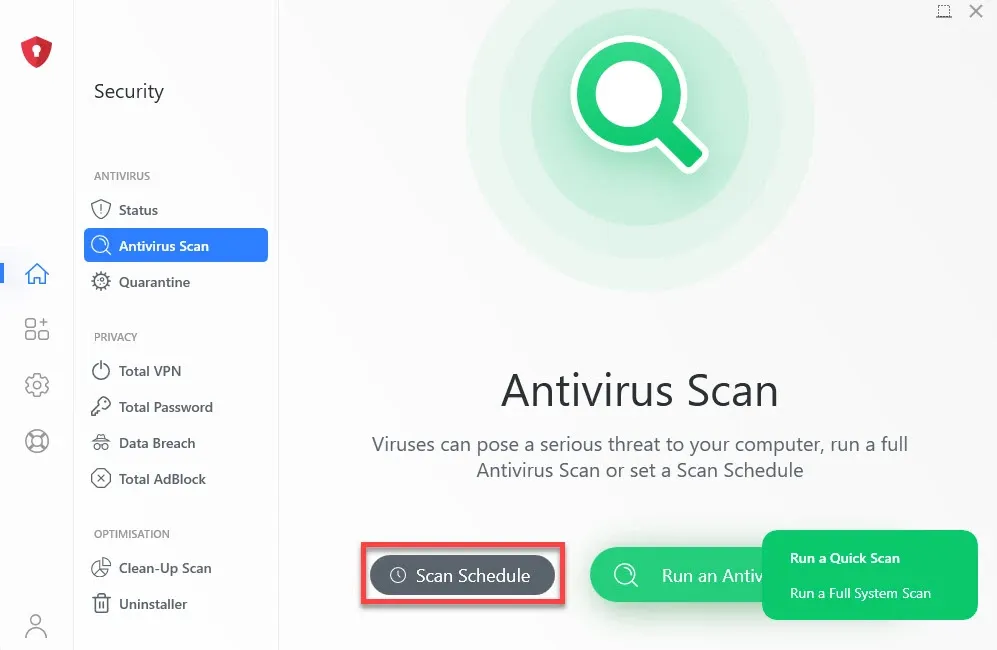
A quick scan covers roughly 15,000 files in about four minutes, while a full system scan of around 300,000 files takes about 25 minutes. Scans can be scheduled so the machine checks itself without you remembering to. - System Tune-Up Tools
Removes junk files, duplicate files and unnecessary startup entries. These are real tools rather than filler: in independent testing, Smart Scan identified over 30GB of recoverable disk space on a normally used machine. - Ad Block Pro
Included on every paid tier, blocking advertising and trackers at the browser level, which also speeds up page loads on ad-heavy sites. - VPN and Password Manager
Both are available, but not on the entry plan. The VPN arrives with Internet Security and the password manager with Total Security.
Plans and Pricing
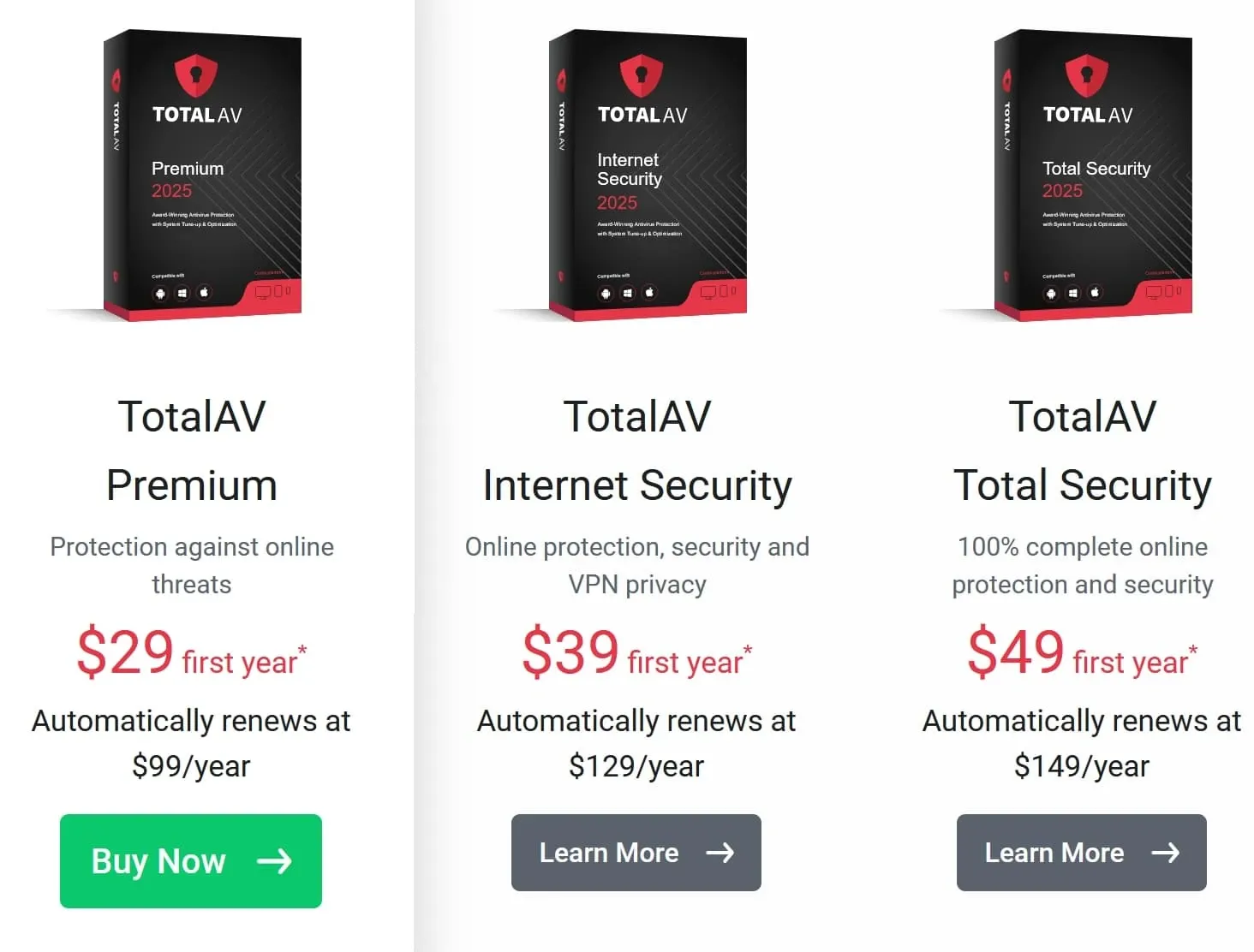
TotalAV sells three paid tiers, separated by device count and by which extras are unlocked. The standard prices on TotalAV's own pricing page are:
- TotalAV Plus - $99 a year, 4 devices, antivirus, tune-up tools, disk cleaner and browser cleanup
- Internet Security - $129 a year, 6 devices, adding Total Adblock and Total VPN
- Total Security - $149 a year, 8 devices, adding the Total Password manager
Those are the rates you renew at. What you are almost certainly quoted on arrival is the introductory offer, which runs far lower - commonly around $19, $39 and $49 for the first year across the three tiers. That gap between the introductory price and the standard price is the widest in this comparison, and it is the single thing to understand before subscribing.
There is nothing improper about promotional pricing; every vendor here does it. What differs is the size of the step. Norton roughly triples on renewal. TotalAV can be five times the introductory figure. On a $19 first year followed by a $99 renewal, the second year costs more than the first two years of several competitors combined.
The mechanics are manageable if you plan for them. Auto-renewal is enabled by default and the reminder email arrives close to the billing date, so after buying, open your account settings and either turn auto-renewal off or put a reminder in your calendar a few weeks before the date. That converts an automatic charge into a decision.
TotalAV offers a 30-day money-back guarantee on annual plans. Note that monthly, quarterly and add-on services carry a shorter 14-day window, so if you subscribe monthly to try the product, you have half the time to change your mind.
On value, the answer depends on the year you are in. At the introductory price, TotalAV is inexpensive for a product with genuine top-tier lab scores. At the standard rate, it sits above suites that include a firewall and behavioral detection, so it is worth actively reassessing at renewal rather than letting it roll.
Speed & System Impact: How Fast Is TotalAV?
AV-TEST rated TotalAV between 5.5 and 6 out of 6 for performance in the January to February 2026 round, noting minimal slowdown during software installation, downloads and browsing. That is a good result, though a step below the perfect scores Bitdefender and Norton achieved in the same period.
AV-Comparatives found a higher performance impact on low-end hardware specifically. If you are installing on a recent machine with an SSD, you are unlikely to notice the product is running. On an older laptop with limited memory, TotalAV is not the lightest option available and Bitdefender would be the better technical fit.
The measured scan times are reasonable. A quick scan of roughly 15,000 files completes in about four minutes and a full scan of around 300,000 files in about 25 minutes, both of which are competitive.
Mobile Apps: Security for Android & iOS
TotalAV provides dedicated applications for Windows, macOS, Android and iOS, and the device allowance on each plan can be spread across any mix of them. With four devices on the entry plan and eight on Total Security, the allowances are more generous than most competitors at the same tier.
The Android app covers malware scanning, web protection and the VPN where the plan includes it. The iOS app is limited by Apple's platform rules to web protection, VPN and a data breach check, as it is for every vendor.
The mobile apps carry the same design approach as the desktop client, which is the point of the product. If you are setting up protection for a parent or a less technical family member across a phone and a laptop, TotalAV is one of the easier products to hand over without also providing support.
Privacy Tools and the VPN
The higher tiers add a privacy layer that is worth assessing separately from the antivirus, because it is where most of the price difference between plans sits.
TotalAV's VPN arrives with Internet Security and covers the same device allowance as the plan it belongs to, with servers across a range of countries and no bandwidth cap. It is a competent inclusion for public Wi-Fi and region-restricted streaming, and it removes the need to pay for a standalone VPN subscription, which for many buyers is the single strongest argument for stepping up from the entry plan.
The Password Manager appears on Total Security, storing credentials in an encrypted vault with browser extensions and mobile apps for filling them. TotalAV also includes a data breach check that tells you whether your email address has appeared in known breaches, which is a lighter version of the dark web monitoring McAfee and Norton build their upper tiers around. It reports exposures rather than actively monitoring for new ones or helping you recover from them.
Ad Block Pro is included on all paid tiers rather than reserved for the top plan. Beyond removing advertising, it blocks the tracking scripts that make ad-heavy pages slow, so the performance benefit is real on news and shopping sites.
What is not included anywhere in the range is worth stating alongside this. There is no firewall on any tier, no parental controls, and no identity theft insurance. Those are all present in the comparable plans from Norton and McAfee. TotalAV's proposition is a competent antivirus with useful cleanup and privacy tools attached, not a full security suite in the sense those two products use the term, and the pricing at the introductory level reflects that.
How TotalAV Compares With the Alternatives
TotalAV is easy to place once you separate what it does well from what it leaves out.
Against Bitdefender, the detection results are close enough not to be a deciding factor. The differences are elsewhere. Bitdefender logged four false alarms to TotalAV's nineteen in 2026 testing, runs measurably lighter on older hardware, and includes behavioral detection and a firewall that TotalAV does not. TotalAV answers with a far simpler interface and system cleanup tools that Bitdefender only partly matches. If the person using the machine will never open the settings, TotalAV is the more realistic choice. If they might, Bitdefender is the more complete product.
Against Norton, the gap is breadth. Norton bundles an unlimited VPN from its entry tier, cloud backup, dark web monitoring and a set of AI scam tools, and backs it with a 60-day guarantee against TotalAV's 30. TotalAV's counter is price in the first year and an interface that asks nothing of you. Norton is the better buy if you will use what is in the bundle; TotalAV is better if you want antivirus and a tidier machine and nothing else.
Against free options, including Microsoft Defender, TotalAV earns its place on the tune-up tools, the ad blocker, the mobile apps and the support channel rather than on raw detection, where Defender is now competitive. That is an honest trade at an introductory price and a harder one at the standard rate.
The summary: TotalAV is a legitimate, lab-verified antivirus with the friendliest interface in this comparison and a genuinely useful cleanup toolkit, sold at a first-year price that undercuts everyone. What you give up is the firewall, the behavioral layer, and the simplicity of a subscription you can leave running without checking the price.
Beginner-Friendly Interface & Support
This is TotalAV's clearest advantage and it should not be underrated. The interface is uncluttered, the primary action is a single large Smart Scan button, and results are presented as plain statements with an obvious next step rather than as a list of technical findings. Installation to first scan takes a couple of minutes with no decisions to make.
For a meaningful share of users, a security product they actually understand and run is worth more than a more capable product whose settings they never open.
The counterpoint is the volume of promotion. The application surfaces upgrade offers for higher tiers and add-on services, and the marketing email cadence is heavier than most competitors. Neither affects protection, but both are part of the experience and are the most common source of complaints about the product. Unsubscribing from marketing email and declining the in-app offers takes a minute and largely resolves it.
Support is available by live chat, email and phone, with a searchable knowledge base covering setup and cancellation.
Verdict: Is TotalAV the Right Choice for You?
TotalAV suits beginners, older users and anyone setting up protection on behalf of someone else. The interface is the most approachable in this comparison and the lab results confirm that the simplicity does not come at the cost of detection.
It also suits people who want antivirus and system cleanup in one application rather than running a separate optimization tool, and buyers who are comfortable reviewing their subscription each year to keep the price low.
Consider an alternative if you want a firewall or behavior-based detection, if you are installing on a low-powered machine, or if you would rather set a subscription up once and not think about it again. Bitdefender is the better fit on older hardware and Norton on breadth of features.
Pros & Cons
Pros
- A perfect 18/18 from AV-TEST in the January to February 2026 evaluation
- Blocked 99.98% of samples in AV-Comparatives 2026 malware testing with an Advanced+ award
- The most approachable interface of any suite in this comparison
- Genuine system tune-up tools that identified over 30GB of recoverable space in testing
- Introductory pricing from about $19, the lowest entry point in this comparison
- Generous device allowances, up to 8 devices on Total Security
Cons
- No firewall and no behavior-based detection layer
- Nineteen false alarms in AV-Comparatives 2026 testing, the highest in this comparison
- Renewal costs several times the first-year price, and auto-renewal is on by default
- Higher performance impact on low-end hardware than the lightest competitors