
Norton Antivirus Review 2026
Last Updated: August 18, 2026
Norton has been a fixture in consumer security for four decades, and the current Norton 360 line is less an antivirus product than a full digital safety bundle. A single subscription covers malware protection, a firewall, an unlimited VPN, a password manager, dark web monitoring, cloud backup and a set of AI-powered scam detection tools, across Windows, macOS, Android and iOS.
On the measures that matter most, Norton delivers. It earned a perfect 6/6 for protection, performance and usability in the AV-TEST evaluation for Windows 11 home users in June 2026, and AV-Comparatives recorded a 99.97% online protection rate in its March 2026 malware test. Norton is also one of the few vendors willing to put money behind its detection claims through its Virus Protection Promise.
The main thing to weigh before buying is cost over time. Norton discounts heavily in the first year, and the price roughly doubles or triples on renewal. That is normal for this category, but the gap is large enough that it belongs in the buying decision rather than as a footnote.
Protection: What the Independent Labs Found
Norton performs at the top of the field in the two testing houses that matter for consumer antivirus.
AV-TEST awarded Norton a perfect score across all three of its categories in the June 2026 Windows 11 round: 6 out of 6 for protection, 6 out of 6 for performance and 6 out of 6 for usability. That result was consistent with the January to February 2026 round, where Norton took a full 18 out of 18.
AV-Comparatives tells a similar story from a different angle. In the March 2026 Malware Protection Test, Norton blocked 96.3% of samples with no internet connection available and 98.7% with cloud lookups enabled, reaching a 99.97% online protection rate overall. In the April 2026 Performance Test it placed 5th out of 20 products with an impact score of 5.3, earning an Advanced+ award.
One number in that same March test deserves a mention: Norton produced 9 false alarms, which is higher than Bitdefender at 4 in the same round. A false alarm means a clean file or site gets flagged as dangerous. Nine is not a high number in absolute terms and most users will never encounter one, but it is a real difference between the two products and worth knowing if you frequently install niche or self-built software.
Taken together, these results place Norton in the leading group alongside Bitdefender, ESET, Kaspersky and McAfee rather than in a class of its own. What separates Norton in practice is the breadth of what comes bundled with that detection engine.
Key Features
- AI-Powered Scam Protection
Norton Genie is an AI assistant that analyzes suspicious messages, offers and links in real time and tells you whether something looks like a scam. It sits alongside Safe Web, Safe SMS, a scam dashboard and deepfake detection. Norton also backs Genie with up to $10,000 in scam coverage. - Virus Protection Promise
If Norton cannot remove a virus from your device, the company refunds your subscription. The promise comes with access to remediation specialists rather than only a chatbot, which is a genuine point of difference in this category. - Unlimited Secure VPN
Available from the Standard plan upward with no bandwidth cap. Several competing suites include a VPN limited to a couple of hundred megabytes per day, which is enough to check email on public Wi-Fi but not to use daily. - Smart Firewall and SafeCam
The firewall monitors inbound and outbound traffic on Windows and Mac, while SafeCam blocks unauthorized applications from switching on your webcam and notifies you when something tries. - Dark Web Monitoring and Password Manager
Norton scans breach data for your email addresses, card numbers and other personal details, and alerts you when something surfaces. The password manager stores credentials in an encrypted vault and fills them across browsers and mobile. - PC Cloud Backup
From 2GB on Standard up to 250GB on the LifeLock tier, with 50GB on Deluxe. This is not a filler feature: keeping a recent off-device copy of your documents is the most reliable way to survive a ransomware infection without paying anything.
Plans and Pricing
Every Norton 360 tier runs the same protection engine. What separates them is how many devices you cover, how much cloud backup you get, and whether identity protection is bundled in.
- Norton 360 Standard - $34.99 for the first year, renewing at $94.99, 3 devices, unlimited VPN, 2GB cloud backup
- Norton 360 Deluxe - $39.99 for the first year, renewing at $124.99, 5 devices, 50GB cloud backup, parental controls
- Norton 360 with LifeLock Select Plus - $99.99 for the first year, renewing at $189.99, 10 devices, 250GB cloud backup, plus identity theft protection and restoration support
- Norton Mobile Security - $19.99 for the first year, renewing at $29.99, a single Android or iOS device
Two details in that table are easy to skim past and both change the value calculation.
The first is cloud backup on Standard. It is 2GB, not the tens of gigabytes the higher tiers offer. That is enough for a folder of documents and nothing more. If backup is part of why you are buying, Standard does not deliver it in any practical sense and Deluxe is the entry point.
The second is the gap between Standard and Deluxe. It is $5 in the first year - $34.99 against $39.99 - and for that you get two more devices, parental controls and 25 times the backup storage. There is almost no scenario where Standard is the better buy at those prices. It becomes a real decision only at renewal, where the two separate by $30.
Renewal is the thing to plan for across the whole range. First-year prices are promotional, auto-renewal is enabled by default, and the second-year charge arrives at the standard rate: Standard nearly triples to $94.99 and Deluxe more than triples to $124.99. Two straightforward ways to stay in control: set a calendar reminder a few weeks before your renewal date so the cost is a decision rather than a surprise, or turn auto-renewal off in your Norton account immediately after purchase and renew manually when you choose to.
Every plan carries a 60-day money-back guarantee, twice the window most competitors offer, which is long enough to run the product through a full month of normal use before committing.
For most households, Deluxe at $39.99 is the plan to buy. LifeLock Select Plus is worth its considerably higher price only if you specifically want identity monitoring with restoration support, which is a different product category bolted onto the same antivirus.
Real-World Performance & PC Resource Impact
Norton once had a reputation for slowing machines down. The current product does not deserve it. AV-Comparatives placed Norton 5th of 20 products in its April 2026 Performance Test with an impact score of 5.3 and gave it an Advanced+ award, and AV-TEST scored it a full 6 out of 6 for performance in June 2026.
In practical terms, background protection on a modern machine with an SSD is unnoticeable during browsing, office work and gaming. Norton also schedules its heavier tasks for idle periods rather than interrupting active use.
The exception is the first full system scan after installation, which indexes every file on the drive. On an older laptop with a mechanical hard disk and a large media library, that initial pass can take a long time and will make the machine feel sluggish while it runs. Subsequent scans are incremental and far quicker. If you are installing on older hardware, start the first scan when you do not need the machine.
Scam Protection and the AI Tools
Scams have overtaken traditional malware as the way most people actually lose money online, and this is where Norton has invested most heavily.
Norton Genie is the centerpiece. You can paste in a text message, an email, a listing or a link and it returns an assessment of whether the content shows the hallmarks of a scam, with an explanation rather than a bare verdict. Safe SMS applies the same analysis to incoming text messages on mobile, and Safe Web flags dangerous sites in search results before you click through. Deepfake Protection analyzes audio in video content for signs of synthetic speech.
Foundational scam protection is included in Norton AntiVirus Plus, Norton 360 Standard and Norton 360 Deluxe rather than reserved for the top tier, and Norton adds up to $10,000 in scam coverage on top.
These tools are genuinely useful, particularly for less technical family members, though they are assistive rather than infallible. Treat Genie as a second opinion on something that already looked suspicious, not as a guarantee.
Mobile and Multi-Device Coverage
A Norton 360 subscription is counted in devices rather than in platforms, so the same license can cover a Windows desktop, a MacBook, two Android phones and an iPad without paying extra for the mix.
The mobile apps are not cut-down versions of the desktop product. On Android you get malware scanning of installed apps and downloads, Web Protection against malicious links in any browser, Wi-Fi security warnings on untrusted networks, and App Advisor, which checks an app for privacy risks and excessive permissions before you install it from the Play Store. Safe SMS filters scam texts, which on a phone is arguably more valuable than file scanning.
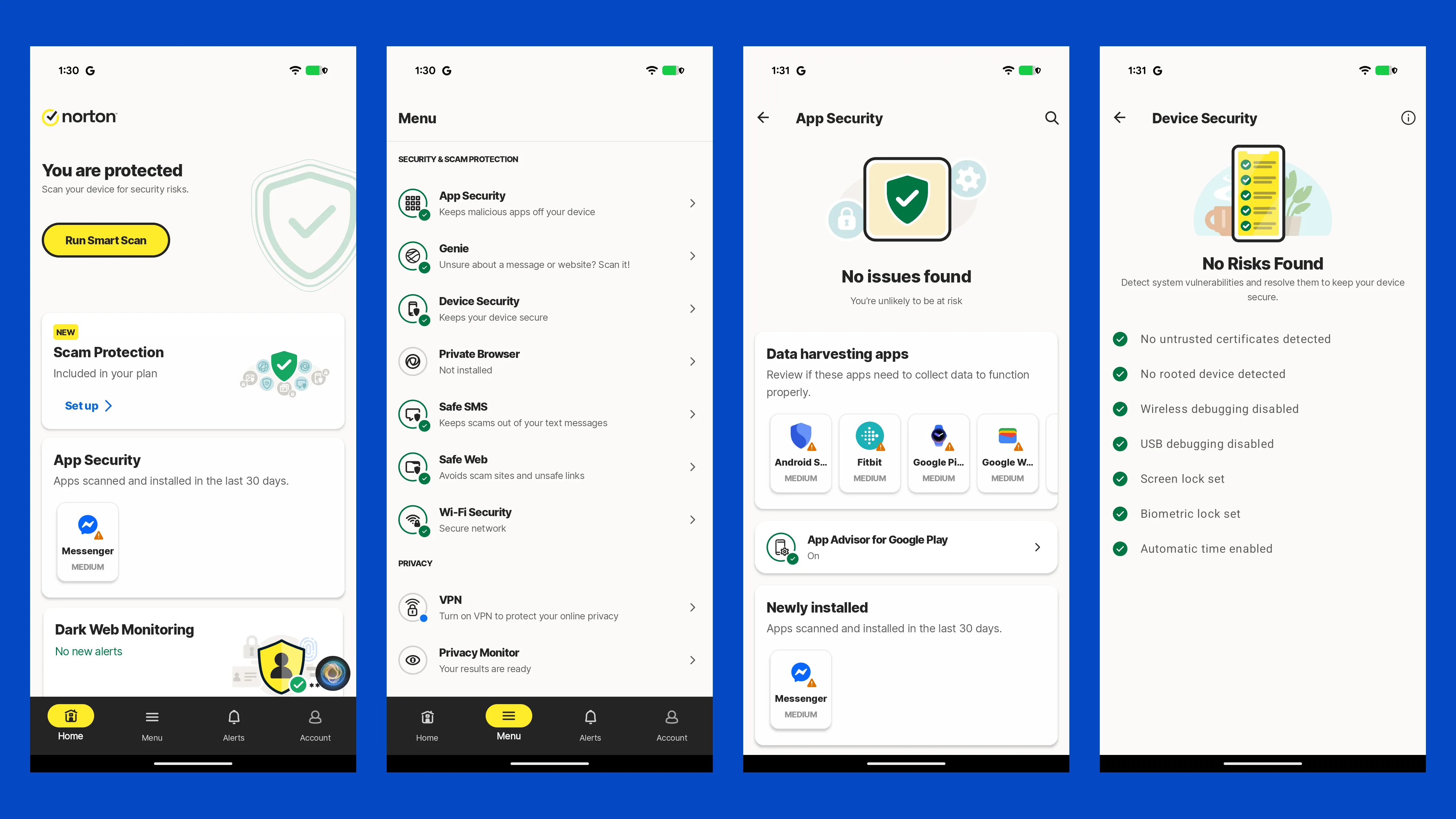
On iOS, Apple restricts what any security app is allowed to do, so no vendor can offer traditional file scanning there. What Norton provides instead is Web Protection, Wi-Fi security, the VPN, dark web monitoring and Safe SMS filtering. That is the same set every competitor is limited to, so it is not a Norton shortcoming, but it is worth knowing that an iPhone license buys you privacy and scam tools rather than antivirus in the classic sense.
One practical detail: cloud backup is Windows only. If your household runs mostly Macs, the storage allowance on the higher tiers is not something you will use, and Standard may be the better value.
Setting Up Norton: What to Do in the First Hour
Norton works out of the box, but four of the things you are paying for are switched off or unconfigured until you go and set them up. Most people never do, which is how a subscription ends up delivering a fraction of its value.
Run the first full scan when you are away from the machine. The initial pass indexes every file on the drive and is the one moment Norton is genuinely demanding. Start it before you go to bed and it is finished by morning. Every scan after that is incremental and quick.
Enable cloud backup and choose what goes into it. By default Norton backs up common document folders, which usually misses the directories people actually care about: project folders, photo libraries stored outside Pictures, and anything on a second drive. Backup is your fallback if ransomware gets through, and a backup of the wrong folders is no fallback at all. This takes five minutes and it is the highest-value five minutes in the whole setup.
Add your email addresses to dark web monitoring. Norton monitors the address you registered with, but most people have three or four in use across banking, shopping and work. Each one you add is another account you will hear about before someone else does.
Install the browser extension and the mobile app. Safe Web only protects the browsers it is installed in, and Safe SMS scam filtering only works on a phone that has the app. A desktop-only installation leaves the two channels where scams actually arrive unprotected.
If you do nothing else, do the backup configuration and the mobile app. Those two cover the failure modes that cost people real money.
User Interface & 24/7 Premium Support
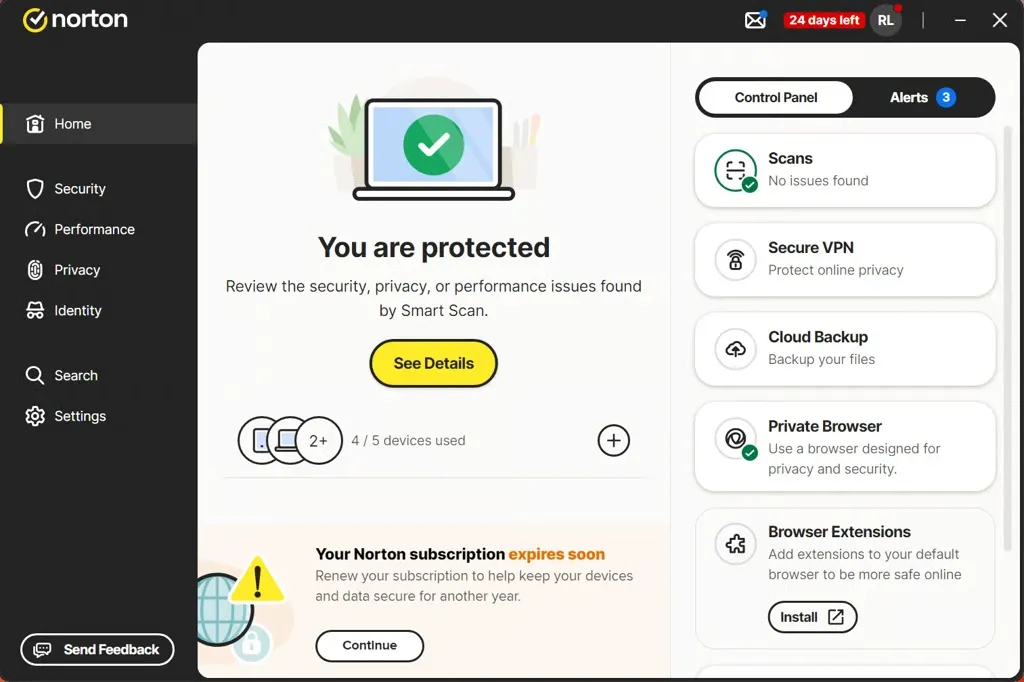
The My Norton dashboard pulls every module into one window, with device security, VPN, backup, password manager and dark web monitoring reachable from a single screen. Defaults are sensible and the product works without configuration, which suits the audience Norton is aimed at.
Support runs 24 hours a day through chat and phone, and the Virus Protection Promise includes access to specialists who will work on a stubborn infection with you remotely. That level of hands-on help is unusual in consumer antivirus, where support often stops at a knowledge base.
The one recurring irritation is promotional messaging. The dashboard surfaces upgrade prompts for higher tiers and add-on services fairly regularly. It is not disruptive, but it is present.
Recommendation: Is Norton 360 Worth It?
Norton makes the most sense for households covering several devices under one subscription, where the VPN, password manager, backup and parental controls would otherwise be bought separately from three or four vendors. Bought individually, those services would cost considerably more than a Deluxe subscription.
It is also a strong fit for anyone who banks and shops online and worries about fraud. The scam protection tools are the most developed in this comparison and are aimed squarely at that risk.
The buyer who should look elsewhere is the one who wants a lean antivirus and nothing more. If you already use a separate VPN and password manager and have no interest in cloud backup, you are paying for a bundle you will not use, and a lighter product will serve you better for less.
Pros & Cons
Pros
- Perfect 6/6/6 score in the AV-TEST June 2026 Windows 11 evaluation
- 99.97% online protection rate in the AV-Comparatives March 2026 malware test
- Unlimited-bandwidth VPN included from the Standard plan upward
- Virus Protection Promise backed by a 60-day money-back guarantee
- AI scam tools including Genie, Safe SMS and deepfake detection
- Up to 250GB of PC cloud backup as a ransomware fallback
Cons
- Renewal roughly triples the first-year price, with Deluxe going from $39.99 to $124.99
- Nine false alarms in the AV-Comparatives March 2026 test, more than Bitdefender recorded in the same round
- The first full system scan is slow on older machines with mechanical hard drives
- The dashboard shows regular upgrade prompts