
McAfee Total Protection Review 2026
Last Updated: August 21, 2026
McAfee is one of the oldest names in the industry, and the current product reflects a deliberate shift in what it sells. Antivirus is still the foundation, but the tiers above the entry plan are built around identity protection: monitoring the dark web for your personal data, removing your details from data broker sites, and insuring you against the cost of identity theft.
The security fundamentals hold up. McAfee scored a perfect 6 out of 6 for protection, performance and usability in the AV-TEST Windows 11 evaluation covering January to February 2026 and repeated the perfect result in the June 2026 round. AV-Comparatives recorded a 99.97% online protection rate in March 2026, matching the best figures in this comparison, and McAfee has previously been named Product of the Year by AV-Comparatives.
Two things shape whether it is right for you. McAfee is more demanding on system resources during scanning than the lightest competitors, and the renewal price is a 200% increase over the first year. Against that, its unlimited-device plans are unmatched here for large households.
Protection: What the Independent Labs Found
McAfee's detection results sit at the top of the field, alongside rather than behind the other leading suites.
AV-TEST gave McAfee Total Protection a perfect 6 out of 6 for protection, 6 out of 6 for performance and 6 out of 6 for usability in the January to February 2026 Windows 11 test, and the product repeated a perfect score in the June 2026 round alongside Norton, Bitdefender, ESET, F-Secure and Kaspersky.
AV-Comparatives recorded a 99.97% online protection rate for McAfee in its March 2026 Malware Protection Test, the same figure Norton achieved in that round. In earlier Real-World Protection testing from February to May 2025, McAfee blocked 99.7% of threats across 800 tested samples with only four false positives, which is a strong accuracy result.
McAfee's mobile results deserve a separate mention because they are often quoted without context. AV-TEST's 2026 evaluation of the Android application found it detected 100% of real-world malware samples. That figure applies to the Android app specifically and should not be presented as a general claim about the desktop product, where the relevant number is the 99.97% above.
Overall, there is no meaningful protection gap between McAfee and the other leading suites here. The reasons to choose between them lie in what surrounds the engine.
Key Features
- Identity Monitoring
Scans dark web sources for more than 60 types of personal data, including email addresses, payment cards, government identification numbers, passport details and phone numbers, and alerts you when something appears. The breadth of data types covered is the widest in consumer security in 2026. - Personal Data Cleanup
Finds your personal information on data broker sites and files removal requests across 40 of them. Data brokers are how much of the information used in targeted scams is assembled, so removing yourself addresses the problem earlier than monitoring does. - Scam Protection
Detects fraudulent content across text messages, email, video and QR codes. QR code scanning in particular addresses a channel most competitors do not yet cover. - Unlimited Secure VPN
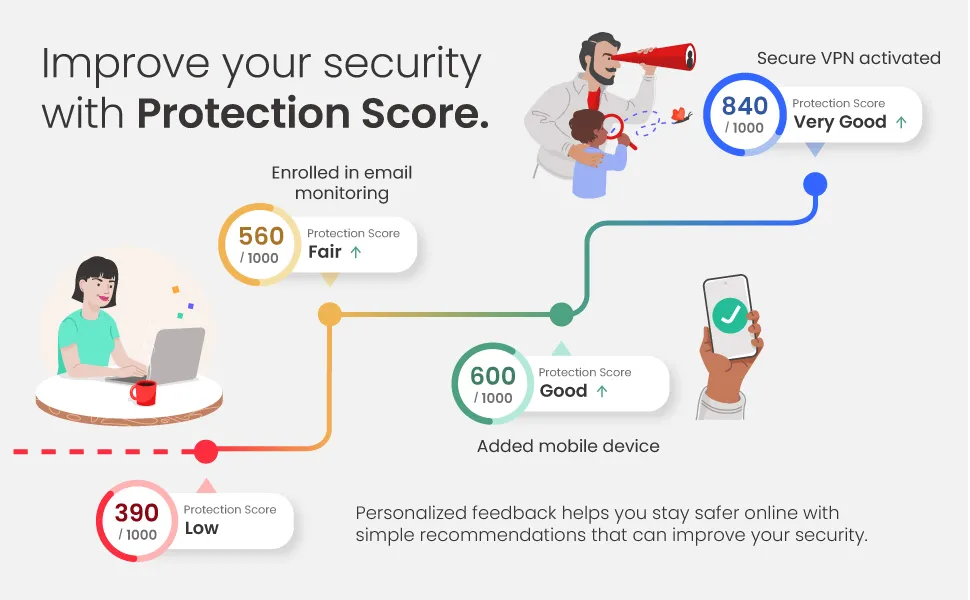
Included from the Essential plan upward with no bandwidth limit, and able to switch on automatically when you join an untrusted network. - McAfee Protection Score
Rates your overall security posture as a single number and lists specific actions to improve it, such as enabling a feature or addressing an exposed account. It turns an abstract question into a checklist. - Identity Theft Coverage
Up to $1 million on the Advanced plan and up to $2 million on Ultimate, with restoration specialists who handle the recovery process on your behalf.
Plans and Pricing
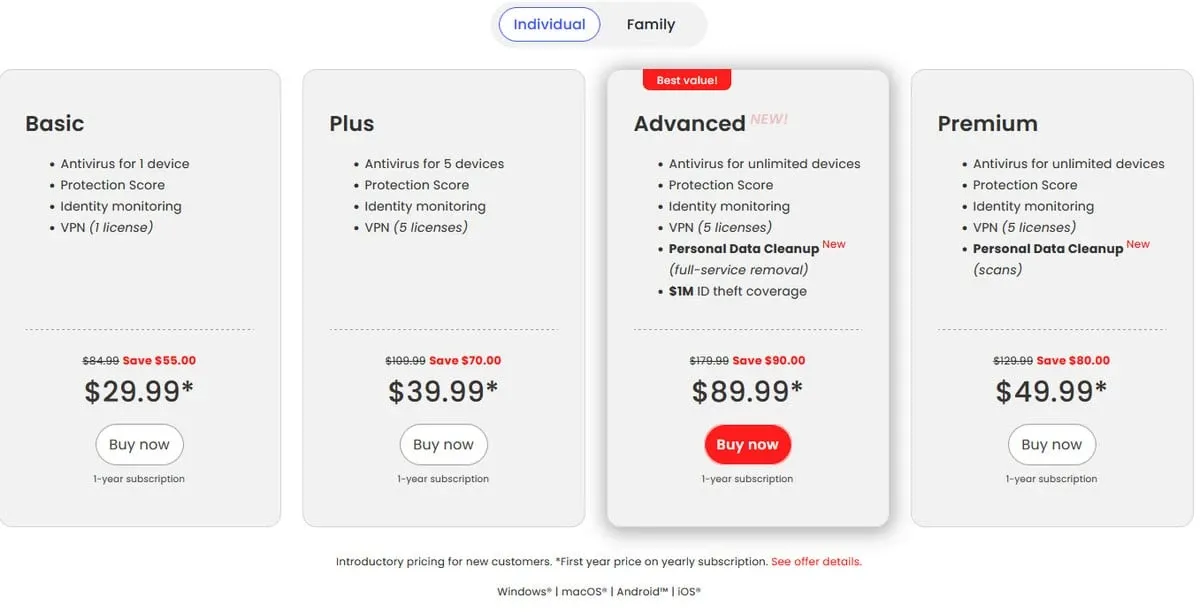
McAfee separates its tiers primarily by identity features and device count rather than by malware protection, which is the same across the range.
- McAfee Basic - from about $29.99 for the first year, one device
- McAfee Essential - from about $39.99 for the first year, up to 5 devices, with antivirus, unlimited VPN, password manager and identity monitoring
- McAfee Advanced - from about $89.99 for the first year, unlimited devices, adding up to $1 million in identity theft coverage and single-bureau credit monitoring
- McAfee Ultimate - from about $199.99 for the first year, unlimited devices, up to $2 million in coverage, three-bureau credit monitoring and dedicated ransomware protection
The renewal step is steep and consistent across markets. Essential moves from about $39.99 in the first year to about $119.99 on renewal, a 200% increase, and the same pattern appears in European pricing at 39.95 to 119.95 euros. As with every vendor here, auto-renewal is on by default, so the practical step is to review the cost before the renewal date rather than after it.
The unlimited-device allowance from Advanced upward is McAfee's strongest pricing argument and no other product in this comparison offers it. A household with ten or twelve connected devices between laptops, phones, tablets and a couple of family members reaches a point where per-device pricing elsewhere costs more than McAfee's flat rate.
If you only want malware protection and a VPN, Essential covers it. The identity features are the reason to move up, and they are only worth paying for if you will actually use them.
Real-World PC Footprint & Full-Scan Performance
This is the area where lab scores and hands-on experience diverge, and both are worth reporting.
AV-TEST rated McAfee a full 6 out of 6 for performance in the January to February 2026 round, indicating no significant slowdown on the standard test workload. That measurement is taken on a reference configuration with modern hardware.
Independent hands-on reviews report a different experience on older machines, describing a noticeable slowdown while real-time scanning is active and initial full scans that can exceed five hours on large drives. Both observations can be true: the reference test measures a defined set of operations on current hardware, while a first full scan indexes every file on a disk that may hold years of accumulated data.
The practical guidance is to run the first full scan overnight or while you are away from the machine. Subsequent scans are incremental and much faster. If you are installing on an older laptop where responsiveness matters day to day, Bitdefender is measurably lighter.
There is a second point worth separating out, because it is often confused with performance. Reviewers have consistently noted that McAfee's applications collect a broad set of user data, which is disclosed in the company's privacy policy. This is a question about what the product knows, not about how fast it runs, and it deserves to be weighed on its own terms rather than folded into a complaint about scan speed. If you are buying McAfee specifically for privacy and identity protection, it is reasonable to read the policy before subscribing.
Set against that, the identity features are the most substantial in consumer security this year, and they require data to function. Monitoring cannot tell you that your passport number appeared in a breach unless it holds your passport number. Some of the collection is the product working as designed. The question is whether the scope extends past that, and the privacy policy is the only place that answer lives.
Unlimited Device Protection Across Platforms
McAfee covers Windows, macOS, Android and iOS, and on the Advanced and Ultimate plans the device count is unlimited, which removes the usual arithmetic about which family members get a license.
The Android app performed strongly in AV-TEST's 2026 evaluation, detecting 100% of real-world malware samples, and includes web protection, Wi-Fi scanning and scam detection for text messages. The iOS app operates within Apple's platform restrictions, providing web protection, VPN, identity monitoring and scam detection rather than file scanning.
Scam Protection is the feature that translates best to mobile, since text messages and QR codes are primarily phone-based attack routes. Having it work across messages, email, video and QR codes on the device where those arrive is a practical advantage over suites that focus their scam tools on the desktop browser.
Security Features Beyond the Scanner
The identity tools get most of the attention, but the conventional security layer underneath them is complete, and it is worth knowing what is there.
The firewall monitors inbound and outbound connections and manages application permissions without requiring you to answer a stream of prompts, which was the historic weakness of consumer firewalls. WebAdvisor is McAfee's browser extension, marking search results as safe or risky before you click, blocking known malicious and phishing sites, and warning about risky downloads. It runs in Chrome, Edge and Firefox and is available free even without a subscription.
File Lock creates an encrypted, password-protected drive on your machine for documents you want kept private, and File Shredder overwrites deleted files so they cannot be recovered with undelete tools. The Password Manager stores credentials with browser and mobile filling, and includes a check that flags reused or breached passwords.
Two features are reserved for the top tier and are worth confirming before purchase. Dedicated ransomware protection, which monitors for unauthorized file encryption and can roll back changes, is on Ultimate only. Three-bureau credit monitoring is likewise Ultimate, while Advanced covers a single bureau.
The gap between Essential and Advanced is therefore not about malware protection at all. Both tiers run the same engine, the same firewall and the same VPN. What Advanced adds is the identity layer: insurance, credit monitoring and unlimited devices. Working out whether you need that layer is the whole of the buying decision with McAfee, and for a single person with a couple of devices and no particular exposure, Essential is the honest answer.
Making the Identity Features Actually Work
McAfee's identity tools are the reason to buy the higher tiers, and they are also the part of the product that does nothing until you feed it information. A subscription left at its defaults monitors one email address and cleans up nothing.
Enter every piece of data you want watched. Identity Monitoring covers more than 60 types of personal information, but it only watches what you enter. That means each email address you use, not just the one you registered with; payment cards; phone numbers; government identification numbers; passport and driver licence details; and bank account numbers. Each entry is a separate early warning. Adding them takes twenty minutes once and is the entire value of the feature.
Start Personal Data Cleanup and expect it to take time. McAfee searches data broker sites for your details and files removal requests with up to 40 of them. Removals are not instant; brokers have their own processing timelines and some require follow-up. The tool re-scans periodically because listings reappear, which is normal rather than a failure. Treat it as a background process that runs for months, not a one-off cleanup.
Turn on automatic VPN for untrusted networks. The VPN is unlimited from the Essential plan up, but by default you switch it on yourself. Setting it to activate automatically on networks you have not marked as trusted means it protects you on hotel and cafe Wi-Fi without you remembering.
Read what the Protection Score is telling you. It is not a vanity metric. The items it lists are usually specific and actionable: an exposed account, an unprotected device, a feature not yet enabled. Working the list down is a reasonable proxy for hardening your setup.
If you buy Advanced or Ultimate for the identity coverage and skip this configuration, you are paying for monitoring that is watching almost nothing.
Protection Score Interface & Restoration Support
The Protection Score is McAfee's best interface decision. Instead of presenting a list of features that may or may not be switched on, it gives a single score and a prioritized list of actions, which suits people who want to know whether they are protected without evaluating each setting.
Behind that, the application spans a lot of ground across security, identity and privacy modules, and finding a specific setting can take a moment. Reviewers have also noted that McAfee's applications collect a broad set of user data, which is disclosed in its privacy policy and is worth reading if that matters to you.
Support is available by chat and phone. The higher tiers include access to identity restoration specialists, which is a substantive service rather than a support tier label: if your identity is misused, someone works the case with you.
Verdict: Is McAfee Total Protection Right for You?
McAfee is the clearest choice for large households. The unlimited-device plans mean every laptop, phone and tablet in the home is covered under one subscription without counting, and no competitor here matches that.
It is equally well suited to anyone who has been caught in a data breach or is concerned about identity theft. The combination of monitoring across 60-plus data types, active removal from 40 data broker sites, and insurance with restoration support is the most developed identity offering in consumer security this year.
Look elsewhere if you are running older hardware where scan performance matters, or if you only need core antivirus. In the first case Bitdefender is lighter, and in the second you would be paying for an identity suite you will not open.
Pros & Cons
Pros
- Perfect 6/6/6 in the AV-TEST January to February and June 2026 Windows 11 evaluations
- 99.97% online protection rate in the AV-Comparatives March 2026 malware test
- Dark web monitoring covers more than 60 types of personal data
- Personal Data Cleanup files removal requests with 40 data broker sites
- Advanced and Ultimate plans cover unlimited devices
- Unlimited-bandwidth VPN included from the Essential plan upward
Cons
- Renewal is a 200% increase, from about $39.99 to about $119.99 on the Essential plan
- Real-time scanning slows older machines, and a first full scan can exceed five hours
- Identity theft insurance and credit monitoring require the Advanced tier or higher
- The applications collect a broad set of user data